



Table of Contents
A backup that has not been tested is not a recovery plan. When invoice access, shared files, Microsoft 365 data, Line of Business applications, endpoint data, approvals, and client records are unavailable, the question is not whether backup software ran. It is whether people can work again.
Keith Bamford, CEO at Daystar, notes: "Recovery planning should start with the workflows people must resume first, then prove the data, access, permissions, and timing support that order."
So, what is cloud disaster recovery in business terms? It is data backup & recovery, business continuity planning, disaster recovery, and disaster recovery planning services working together, aligned to RPO (Recovery Point Objective), RTO (Recovery Time Objective), documentation, and regular testing.
What Is Cloud Disaster Recovery For Everyday Business Operations
Cloud recovery (often referred to as Disaster Recovery as a Service or DRaaS) is the process of restoring systems, files, applications, and access from protected copies using cloud-based infrastructure rather than local hardware or backup drives when the primary environment is unavailable, corrupted, or unsafe to use. The measure is not a “successful” backup status. It is whether payroll can be approved, an invoice can be sent, and a project manager can open the right client folder without starting another support scramble.
-
Restore usable data: Recovered data must be clean, current enough, and accessible to the right users.
-
Recover business workflows: Recovery should reconnect invoices, scheduling, client files, approvals, and handoffs.
-
Protect remote access: Remote workers need secure access to restored systems, not shared passwords or improvised workarounds.
-
Prove recovery works: Testing supports audit readiness and confirms documentation matches the real environment.
Cloud Based Disaster Recovery Starts With RPO And RTO
RPO is how much data your organization can afford to lose. RTO is how long a system can be down before operations are materially affected. Payroll approval, client records, shared project folders, and scheduling platforms each deserve separate discussion because not every system carries the same operational weight.
In our cloud based disaster recovery planning, we design local and cloud backup around each client's RPO and RTO, using vCIO guidance, technical alignment, roadmap planning, and budget conversations so recovery targets are business decisions rather than default vendor settings.
Scenario: A construction office needs current job costing files and dispatch schedules restored before crews lose field productivity. If the schedule is current but job costing is a day behind, purchasing and change-order approvals still stall.
Cloud Computing Disaster Recovery And The Local Backup Question
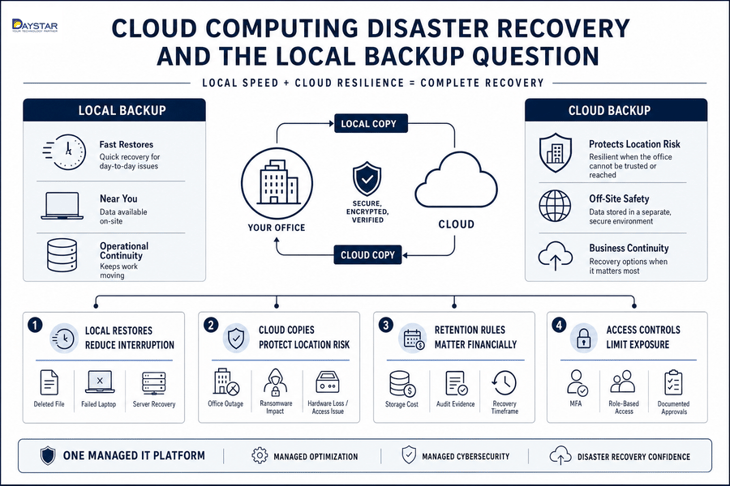
Local backup and cloud backup solve different recovery problems. Local backup supports faster restores when a file is deleted, a laptop fails, or a server needs quick recovery. Cloud backup protects against location-level risk, including office outages, ransomware impact, hardware loss, or a building access issue.
In Daystar Direct, every client receives one Managed IT Services platform with managed optimization and managed cybersecurity, so cloud computing disaster recovery is not split across confusing service tiers.
-
Local restores reduce interruption: A deleted proposal file or failed workstation can often be restored quickly from a local copy.
-
Cloud copies protect location risk: Cloud copies keep recovery options available when the office environment cannot be trusted or reached.
-
Retention rules matter financially: Retention affects storage cost, audit evidence, and how far back finance can recover invoice records.
-
Access controls limit exposure: Recovery copies need MFA, role-based access, and documented approvals.
Disaster Recovery Cloud Testing Turns Backup Into Proof
Testing can interrupt schedules if it is dropped into the workweek without planning, so the process should be narrow, documented, and tied to a real system owner. A disaster recovery cloud test should validate usable files, application access, permissions, recovery time, and documentation. Our process-driven approach, including ticket visibility and alignment documentation, reduces guesswork when a restore becomes an operational deadline.
-
Pick one critical system first, such as the accounting platform.
-
Restore a sample file and verify it opens correctly.
-
Confirm application login and permissions for the user who performs the workflow.
-
Time the restore against the documented RTO, including access validation.
-
Document gaps, owner, due date, and retest date in the support record.
Prove Your Recovery Plan Works
Cloud disaster recovery only matters if your team can resume work. Daystar helps align backups, workflows, RPO, RTO, and testing.
Cloud Disaster Recovery Decisions That Affect Budgets And Audits
Recovery choices affect cash flow, compliance evidence, and day-to-day workload. The issue shows up when teams recreate spreadsheet updates, billing waits for invoice history, or an unsupported endpoint holds the only local copy of a client file. We reduce that ambiguity through Daystar Direct, vCIO guidance, Help Desk Support, proactive monitoring, and documented alignment reviews.
-
Downtime delays cash flow: If billing cannot access invoice data, revenue work waits.
-
Unclear ownership slows recovery: Vendor confusion delays decisions about Microsoft 365, the firewall, or a Line of Business application.
-
Untested backups weaken audits: Auditors look for evidence, not assumptions.
-
Endpoint gaps create rework: Unsupported laptops and missing asset records lead to duplicate data entry.
-
Vendor sprawl adds confusion: Multiple tools and contracts make escalation harder during a time-sensitive restore.
The next step is to make recovery responsibilities visible before a disruption.
Backup testing, system monitoring, documented recovery steps, and security awareness training all give recovery plans the evidence and structure they need.
|
Decision Area |
Operational Example |
Budget or Audit Signal to Track |
Practical Ownership Check |
|---|---|---|---|
|
Recovery tier assignment |
Finance ERP restored within 4 hours; archive file share restored within 48 hours |
Monthly cost by recovery tier compared with invoice volume, payroll deadlines, and month-end close dependencies |
vCIO review confirms which systems require premium recovery and which can use lower-cost retention |
|
Evidence collection |
Backup test logs, restore screenshots, ticket IDs, and administrator approval records stored in Daystar Direct |
Auditor requests matched to dated proof instead of verbal confirmation from IT or accounting |
Help desk and infrastructure teams use one ticket trail for restore validation and approval handoffs |
|
Monitoring escalation |
Failed backup job for Microsoft 365 mailbox data triggers an alert before the next business morning |
Number of unresolved backup failures older than 24 hours and time from alert to remediation |
Proactive monitoring rules identify whether Daystar, the software vendor, or an internal approver must act |
|
Endpoint recovery scope |
Remote laptops mapped to device serial number, user profile, encryption status, and approved applications |
Rebuild labor hours, replacement device spend, and lost productivity by department after a device failure |
Documented alignment reviews verify supported devices, unsupported personal hardware, and replacement workflows |
|
Vendor dependency mapping |
CRM, payment gateway, email security, and file storage vendors linked to contract owner and support path |
Open incidents delayed by missing vendor credentials, expired support plans, or unclear service boundaries |
One managed IT platform records vendor contacts, escalation routes, and renewal dates before an outage |
Making Disaster Recovery In Cloud Computing Practical With Daystar
Recovery planning works when RPO, RTO, local backup, cloud backup, testing, documentation, and support workflows align with how work actually gets done, from invoice approvals to shared client files and Line of Business applications.
At Daystar, we provide local and cloud backup designed around RPO and RTO, with Managed IT Support, proactive monitoring, Disaster Recovery Planning, and in-house Help Desk Support. Daystar Direct gives every client one Managed IT Services platform with managed optimization and managed cybersecurity, while our vCIO guidance, technical alignment, and documented processes make recovery planning practical and accountable.
If you want a clearer recovery plan, contact us and we will help you evaluate where your current backups, workflows, and recovery documentation need stronger alignment before invoice access, client files, or critical approvals are on the line.
Explore Cybersecurity Services Near You