


Technology buying now affects security controls, employee productivity, invoice predictability, software access, device lifecycles, and vendor accountability. Procurement can no longer sit outside the IT roadmap.
With 64% of respondents saying procurement influence is growing in their organization, leaders need IT procurement best practices that prevent fragmented buying, unclear approvals, unsupported tools, and surprise renewal costs. The most practical IT procurement best practice is to align every purchase with business goals, lifecycle planning, and security requirements before money is committed.
Keith Bamford, CEO at Daystar, notes: "A technology purchase is not just a line item. It changes support workflows, security exposure, user productivity, and future replacement costs, so leaders need procurement decisions tied to the roadmap before approval."
Build An IT Procurement Process That Supports Growth
Improve approvals, control renewals, and align technology purchases with security, support, and long-term budget planning.
IT Procurement Best Practices Start With Operational Visibility
Visibility matters because leaders cannot control invoices, tickets, access requests, or replacement planning when technology assets are scattered across departments and vendors. A finance manager reviewing a renewal invoice should not have to ask three teams whether a license is still used, who approved it, and whether IT can support it. That information should already be visible through asset records, vendor documentation, renewal calendars, and the IT roadmap.
- Asset inventory accuracy: Laptops, servers, warranties, licenses, and Cloud Services need reliable IT Asset Management & Tracking and Systems Inventory Management.
- Renewals tied to budget: Renewal dates and vendor contracts should feed IT Budget Planning, especially as small businesses plan higher 2025 spending across 48% laptops and 47% security solutions, along with AI tools.
- Security review first: Security and compliance review should happen before tools are purchased, because only 21% of businesses and 22% of charities considered cyber security to a large extent when purchasing software.
- Approval workflow control: Approval workflows prevent duplicate software, unmanaged subscriptions, and disconnected invoices.
Operational visibility also reduces reactive support issues. When IT knows which devices are nearing warranty expiration, which licenses are assigned to users, and which vendors own which systems, procurement becomes part of lifecycle refresh tracking rather than a scramble after a laptop fails or a renewal lands without warning.
Why One IT Procurement Best Practice Is Not Enough
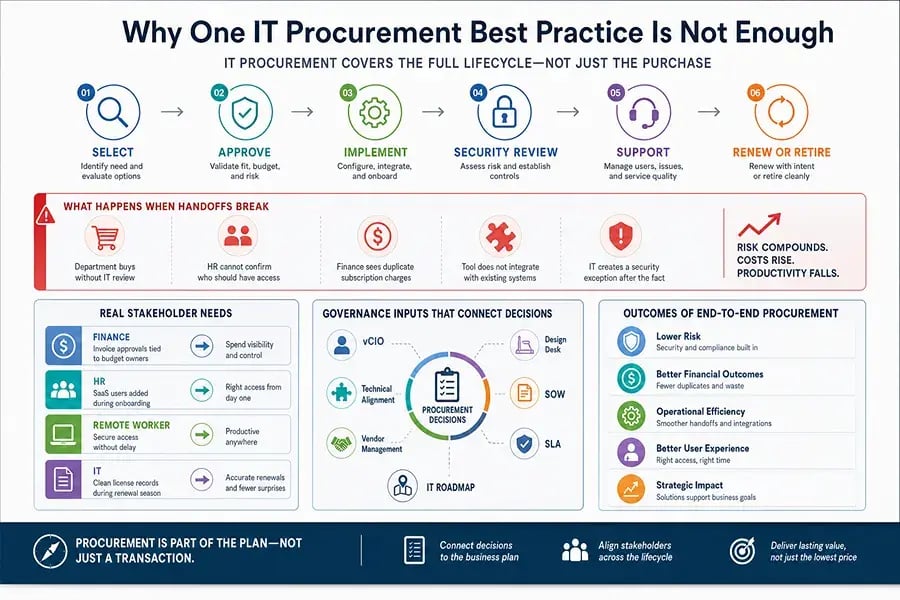
A department buys software without IT review. HR cannot confirm who should have access, finance sees duplicate subscription charges, the tool does not integrate with existing systems, and IT has to create a security exception after the fact. Risk compounds through ordinary handoffs, not only through major projects.
That is why IT procurement best practices need to cover the full lifecycle: selection, approval, implementation, security review, support, renewal, and retirement. A single purchasing rule cannot manage every dependency, especially when procurement professionals spend up to 70% of their time on transactional activities instead of strategic work.
What this looks like in practice Finance needs invoice approvals tied to budget owners, HR needs SaaS users added during onboarding, remote workers need secure access without delay, and IT needs clean license records during renewal season. Governance inputs such as a vCIO, Technical Alignment, Vendor Management, SOW terms, SLA expectations, and the IT roadmap help these decisions support the business plan rather than chase the lowest device or software price.
Best Practices In IT Procurement Protect Budgets And Support Quality
Procurement affects far more than purchase price. It shapes Help Desk Support workload, implementation timelines, security reviews, and future replacement costs. Strong standards reduce tickets, prevent poor-fit tools, and create more predictable operating expenses.
- Standardize device and software selection. Standard models reduce support variation, simplify onboarding, and make lifecycle refresh tracking easier when a new employee needs a laptop, dock, security profile, and Microsoft 365 access.
- Route approvals through budget owners. Approval routing should connect requests to department budgets, finance visibility, and IT review, so managers do not discover unplanned subscription costs only after invoices arrive.
- https://www.spiceworks.com/research/state-of-it-2025/]].
- Define vendor accountability terms. Vendor Management should document ownership, support contacts, escalation paths, and service expectations before purchase.
- https://usercentrics.com/guides/data-privacy/data-privacy-statistics/]] when selecting products or vendors, procurement standards need to address data handling, access control, and compliance from the start.
|
Procurement Checkpoint |
Operational Owner |
System or Evidence Used |
Failure Mode Prevented |
Practical Control |
|
New SaaS request intake |
Department manager with IT Budget Planning review |
Procurement form, finance GL code, SaaS inventory |
Duplicate tools billed to different departments |
Require finance coding and IT confirmation before purchase order creation |
|
Endpoint purchase approval |
IT operations lead and Help Desk Support manager |
Asset platform, approved hardware catalog, warranty report |
Unsupported laptop models increasing imaging time and driver issues |
Limit purchases to approved configurations unless an exception is documented |
|
Vendor onboarding |
Vendor Management coordinator |
Signed MSA, support SLA, escalation matrix |
No clear contact during outages, license disputes, or failed integrations |
Store contacts, renewal dates, and escalation paths in the service management system |
|
Lifecycle refresh review |
IT asset manager and finance analyst |
Refresh report, depreciation schedule, warranty expiration list |
Emergency replacement outside the planned budget cycle |
Review 6-, 12-, and 18-month replacement forecasts during budget planning |
|
Security and data review |
Security officer, IT administrator, and legal reviewer |
SOC 2 report, data processing agreement, SSO/MFA checklist |
Unapproved storage of employee, financial, or client data |
Block purchasing until data classification, authentication, and retention terms are approved |
IT Procurement Process Best Practices Turn Buying Into Governance
How can technology purchasing become a governance process that supports growth without slowing down the business? The answer is not a larger approval maze. It is a practical connection between asset inventory, approval workflows, Vendor Management, lifecycle budgeting, and the IT roadmap.
IT procurement process best practices make purchasing clearer and faster while reducing operational risk. Governance should connect vCIO guidance, Statement of Work clarity, Service Level Agreements, Vendor Management, and roadmap development so purchases fit the organization's environment and priorities. In our process-driven view, procurement governance works when it removes confusion: requesters know what information to provide, finance knows who owns the cost, IT knows when review is required, and leaders can see how a purchase supports the broader operating plan.
A practical governance checklist should include:
- Define request and approval roles so department heads, finance, and IT each know their responsibility.
- Require security and compatibility review before purchase so new tools do not create unsupported integrations, access issues, or unmanaged file storage.
- Document vendor ownership and renewals so support contacts, renewal dates, and escalation paths are visible before an invoice or outage creates urgency.
- Tie purchases to roadmap cycles so Managed IT Services support budget planning, lifecycle refresh, and the operating model.
IT Procurement Practices For Security And Lifecycle Control
Security gaps often begin before implementation, when tools are purchased without reviewing access controls, data storage, Data Backup & Recovery needs, vendor security patch management, or support responsibilities. Secure purchasing gives leaders control before systems become embedded in daily workflows, and it supports the operational discipline behind IT Security Services, Endpoint Protection, MFA, Disaster Recovery, Proactive System Monitoring, and strategic budgeting.
Procurement discipline touches department heads, finance, IT, and end users, but the next steps are concrete:
- Create or update an approved technology list so employees know which tools are supported, secure, and compatible.
- Review current subscriptions and renewals to identify duplicate tools, unused licenses, and contracts needing budget attention.
- Assign ownership for every major vendor relationship so support, renewals, and escalation paths do not depend on informal knowledge.
- Require MFA, backup, and access control review for tools that store client, employee, financial, or operational data.
- Build replacement planning into the annual IT budget because specialized equipment is often adopted to improve quality or reliability at 49.8%, and that value declines when devices age past supportable lifecycles.
The security question is not only whether a vendor looks credible during selection. Leaders need to know where data will live, who can access it, how accounts will be removed when employees leave, whether backup and recovery requirements are met, and who owns the support path when the tool affects payroll, billing, client files, or production work.
Build A Procurement Model That Supports The Business
A mature procurement model gives leaders clearer approvals, stronger vendor accountability, fewer unsupported tools, stronger security review, more predictable budgeting, and technology purchases that support business growth instead of creating operational drag.
At Daystar, we help clients connect procurement decisions to Technology Strategy, Roadmap, & Budgeting through vCIO guidance, Technical Alignment Services, Vendor Management, and Help Desk Support. Daystar Direct is our one managed IT services platform, designed to align managed optimization, managed cybersecurity, strategic planning, and support in one solution. Each client environment has unique needs, but procurement works best when the process is documented, visible, and tied to the business plan.
If your organization needs a more disciplined IT roadmap and procurement model, contact us to discuss where purchasing is creating risk, cost, or friction today-whether that starts with a surprise renewal invoice, an unsupported SaaS tool, or a device lifecycle plan that needs executive visibility. Contact us today.
|
Explore IT Support Services Near You |