


Business leaders are asking what IT procurement is because unmanaged technology buying now affects approvals, tickets, invoices, vendors, device lifecycles, cloud subscriptions, cybersecurity requirements, and budget predictability.
When 75% of business leaders struggle with manual procurement processes, the issue is operational risk, not administrative friction. IT procurement connects each purchase to reliability, security, lifecycle planning, and financial control before the spend creates downstream complexity.
Keith Bamford, CEO at Daystar, notes: "Technology purchases should never be isolated from support, security, documentation, and budget planning. The approval decision is where leaders either prevent complexity or allow it into daily operations."
Take Control Of IT Purchasing Before Complexity Grows
Align technology purchases with security, support, budgets, and lifecycle planning so new tools do not create avoidable risk or surprise costs.
What Is IT Procurement
IT procurement is the structured process of assessing, selecting, purchasing, documenting, deploying, and managing technology assets and services. It covers hardware, software licensing, Cloud Services, cybersecurity tools, Network Infrastructure, warranties, support agreements, and vendor contracts. Leaders need clarity before approving spend because fragmented purchasing creates confusion over support ownership, security responsibility, and invoice reconciliation. That matters when 40-70% of all costs are procurement-related in many organizations.
A practical procurement review should answer four questions before a purchase order or credit card charge moves forward:
- Business need validation: Confirm the purchase solves a documented workflow issue, not a short-term frustration that adds another tool and invoice.
- Security and compliance review: Check access, data handling, MFA, endpoint protection, and regulatory exposure before the vendor enters the environment.
- Lifecycle and warranty planning: Track refresh timing, support coverage, warranty status, and replacement risk.
- Budget and approval control: Route spend so finance, IT, and leadership connect purchases to roadmap priorities and the right business owner.
What Is The IT Procurement Process
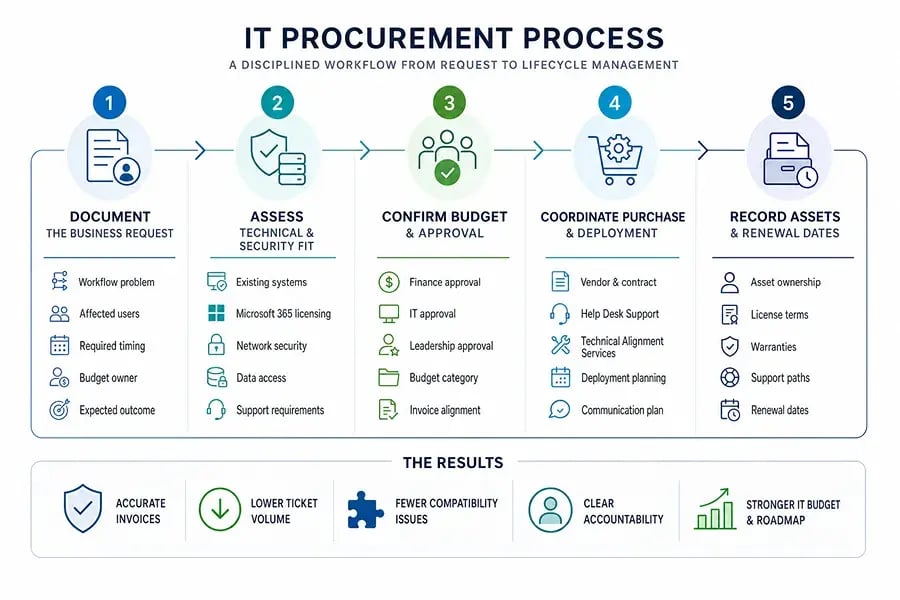
In operational terms, the IT procurement process means intake, assessment, approval, sourcing, purchasing, deployment coordination, documentation, and lifecycle tracking. Each step protects invoice accuracy, reduces avoidable tickets, prevents compatibility issues, and clarifies accountability before money is spent. That discipline matters because procurement professionals spend up to 70% of their time on transactional activities instead of strategic initiatives.
A clean workflow gives employees a path to request tools without forcing finance or IT to reconstruct the decision later:
- Document the business request: Capture the workflow problem, affected users, deadline, budget owner, and expected outcome.
- Assess technical and security fit: Reconcile the request against existing systems, Microsoft 365 licensing, Network Security, data access, and support requirements.
- Confirm budget and approval: Route the request through finance, IT, and leadership so invoices match the decision.
- Coordinate purchase and deployment: Align procurement with Help Desk Support, Technical Alignment Services, and deployment planning.
- Record assets and renewal dates: Document ownership, licenses, warranties, support paths, and renewal dates.
IT Procurement Shapes Daily Operations Before A Purchase Is Approved
A department requests new laptops, a SaaS tool, or a Cloud Service to fix an urgent workflow issue. No one checks licensing, security settings, integration requirements, warranty coverage, or support ownership. The purchase feels fast until employees submit access tickets, finance sees an unfamiliar renewal, and IT discovers the tool stores client data outside approved controls. That pattern helps explain why 64% say procurement influence is growing inside their organizations.
What this looks like in practice. Microsoft 365 licensing should match the user's role, MFA should be confirmed before access is granted, and endpoint protection should be active before a device is deployed. Invoice matching should validate the approved product and quantity. Warranty status should be recorded in the asset inventory, and Help Desk ticket routing should identify who owns support.
When procurement controls, Network Monitoring, lifecycle tracking, and documentation work together, growing teams add technology without adding avoidable friction. In our work with clients, procurement is not only a finance workflow; it determines whether the Help Desk can resolve tickets quickly, whether the vCIO has accurate budget data, and whether leadership sees technology risk before it reaches employees.
|
Procurement Checkpoint |
Operational Example |
Owner or Approver |
Risk Prevented |
|
Data handling review |
Confirm whether a proposed CRM add-on stores client records in the U.S., EU, or a third-party subprocessor environment before purchase. |
Security lead and compliance manager |
Unapproved client data exposure or contract violation |
|
Integration validation |
Test whether a new HR platform can sync users with Microsoft Entra ID and deactivate accounts automatically after termination. |
IT systems administrator |
Manual account cleanup, orphaned access, and delayed offboarding |
|
Support ownership assignment |
Document whether password resets, vendor escalations, and configuration changes go to the internal Help Desk, the software vendor, or the department admin. |
IT service desk manager |
Unclear ticket routing and longer employee downtime |
|
Renewal and budget mapping |
Enter SaaS renewal dates, seat counts, purchase order numbers, and department cost centers into the finance system before the first invoice arrives. |
Finance operations analyst |
Surprise renewals, duplicate subscriptions, and missed cancellation windows |
|
Asset lifecycle planning |
Tag newly purchased laptops in the asset system with warranty end date, assigned employee, encryption status, and expected replacement year. |
Endpoint management technician |
Unsupported hardware, incomplete inventory, and unmanaged replacement costs |
What The IT Procurement Process Protects
A disciplined procurement process protects operating performance, data security, employee productivity, financial predictability, and vendor accountability. It also gives leaders a control point before tools, devices, invoices, and risks become embedded in daily work. Privacy and vendor scrutiny now matter earlier in the buying cycle because 82% of companies consider privacy certifications when selecting a product or vendor in their supply chain.
- Fewer unsupported technology decisions: Unsupported tools increase Help Desk complexity because technicians must troubleshoot systems that were never documented, approved, or aligned with the support model.
- Cleaner licensing and renewals: Documented licensing reduces surprise renewals, overlapping SaaS subscriptions, and invoice confusion. Finance can reconcile spend against approved users, terms, and business owners.
- Stronger security review points: Procurement creates a checkpoint for MFA, Endpoint Protection, access control, data handling, and vendor risk before a new device, application, or Cloud Service touches client data.
- Better lifecycle budget planning: Asset tracking supports refresh planning. Structured technical reviews, including our 225-plus point Business Alignment Checklist, give leaders visibility into replacement timing, warranty exposure, and budget impact.
- Clearer ownership after deployment: Documentation helps teams route tickets, approve changes, and reconcile vendor responsibilities so issues move through the right support path.
What IT Procurement Should Include Before Approval
Changing approval habits is difficult because teams often buy technology to solve urgent workflow problems. The goal is not to slow the business. It is to keep urgent purchases from becoming security gaps, duplicate subscriptions, unsupported devices, or budget surprises. That is why more finance leaders treat procurement as a control function, with 40%+ of Finance and Accounting teams prioritizing procurement.
Before approval, leaders should require a complete record that the Help Desk, finance, security, and vCIO can use later for support, renewal tracking, security review, and budget planning.
- Require a documented business reason, including the workflow problem, affected users, expected outcome, and whether an existing tool already solves the need.
- Route requests through IT, finance, and security review based on spend and risk.
- Check compatibility with current systems, cybersecurity standards, Microsoft 365 licensing, Network Infrastructure, data access rules, and backup requirements.
- Record owner, renewal date, warranty, support path, budget category, and vendor contact so Help Desk Support, Client Success Managers, Design Desk engineers, and vCIO planning have accurate information.
Make IT Procurement Easier To Manage Across Approvals, Security, And Budgets
Better procurement gives leaders clearer approvals, stronger security controls, cleaner invoices, fewer support tickets, and more predictable IT budgets, especially as analysts expect the global procurement software market to reach $9.5 billion by 2028 through investment in automation, analytics, and digital transformation.
We help clients align procurement with strategy, security, lifecycle planning, Vendor Management, and day-to-day support through a complete Managed IT Services approach. Daystar Direct is our one Managed IT Services platform. It includes managed optimization, managed cybersecurity, Help Desk Support, Technical Alignment Services, and Technology Strategy, Roadmap, & Budgeting as part of the same operating model, not as tiered or à la carte service decisions.
We support both fully outsourced and co-managed IT support services, helping clients improve procurement visibility, lifecycle planning, Vendor Management, and IT budgeting while keeping technology aligned to business goals. If your team is dealing with urgent laptop requests, unfamiliar SaaS renewals, or support tickets tied to undocumented tools, contact Daystar to start the conversation. Contact us today.
|
Explore IT Support Services Near You |