


Table of Contents
The observance falls every year on November 30, which makes it a useful year-end checkpoint. Holiday phishing, staffing gaps, delayed approvals, and rushed purchasing decisions create risk when help desk tickets, user access, backups, patching, procurement, and compliance evidence are reviewed separately.
At Daystar, we connect cybersecurity across people, process, and technology through training, access control, documented policies, endpoint controls, backups, Network Security, monitoring, Technical Alignment, and vCIO guidance.
Keith Bamford, CEO at Daystar, notes: "Treat the date as a workflow review, not a security reminder, because unresolved access, backup, and approval gaps become harder to fix during year-end pressure."
National Computer Security Day Checks That Should Happen Before Year End
A focused year-end checklist is more useful than a broad security wish list. The point is to verify the controls that affect daily work, audit readiness, invoice approvals, and recovery confidence before holiday schedules slow decisions. Our process-driven reviews focus on where a missed control becomes a delayed onboarding ticket, failed audit response, invoice fraud exposure, downtime, or recovery uncertainty.
-
User access cleanup: Review active accounts, former employees, shared mailboxes, admin accounts, and application permissions. Password risk remains practical, with modern hardware able to attempt 100 billion passwords per second.
-
MFA coverage review: Confirm MFA for Microsoft 365, VPN, payroll, financial systems, and privileged accounts, especially since one RTX 4090 GPU can guess certain eight-character passwords within 17 seconds. In one password sample, 45% could be guessed within one minute, 59% within one hour, and 73% within a month.
-
Patch status check: Review endpoints, servers, Managed Firewall, routers, switches, and applications so known issues do not carry into January.
-
Backup test validation: Confirm Data Backup & Recovery is restorable, not just running. Document RPO and RTO expectations before an outage, ransomware event, or failed system update.
A Computer Security Day Access Review For Accounts, Devices, And Approvals
Access problems often begin as workflow gaps, not tool failures. A manager approves a new SaaS application without IT visibility, a shared mailbox keeps permissions from an old role, or an unused laptop stays in inventory without Endpoint Protection. Password reuse sharpens the risk, as 56% of ITRC victims and 59% of general consumers report using the same password on each account. Research also reports that 49% of security incidents involve compromised passwords, while 84% of users reuse passwords across multiple accounts.
Practical snapshot: An employee is offboarded before the holiday break, but Microsoft 365 access remains active. The accounting application login is not removed, an unused phone stays enrolled, and the approval chain between HR, finance, and IT is unclear.
Cleanup becomes reliable when ownership is written into the workflow rather than left to memory, inbox searches, or one-off requests.
We support user access reviews, employee onboarding and offboarding, MFA, and IT Asset Management.
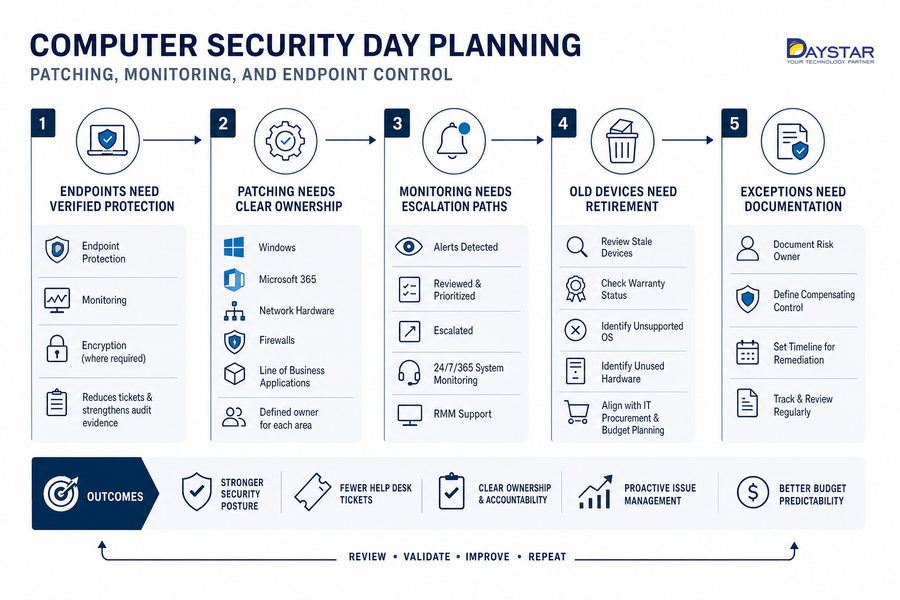
Computer Security Day Planning For Patching, Monitoring, And Endpoint Control
Outdated systems create support noise, security exposure, and budget surprises. The work is not to add more tools; it is to prove that existing controls are current, monitored, and owned. That is how a managed environment becomes quieter over time, with fewer recurring tickets and clearer lifecycle decisions.
-
Endpoints need verified protection: Confirm laptops, desktops, and servers have current Endpoint Protection, monitoring, and encryption where required.
-
Patching needs clear ownership: Identify who owns patches for Windows, Microsoft 365, network hardware, firewalls, and Line of Business applications.
-
Monitoring needs escalation paths: Alerts only help when someone reviews, prioritizes, and escalates them. Our 24/7/365 System Monitoring and Remote Monitoring and Management support proactive issue management.
-
Old devices need retirement: Review stale devices, warranty status, unsupported operating systems, and unused hardware. Connect hardware asset management to IT procurement and budget planning before emergency replacement drives the decision.
-
Exceptions need documentation: If a system cannot be patched or replaced immediately, document the risk owner, compensating control, and timeline.
A Business-Focused Security Day Backup And Recovery Review
Testing backups and recovery workflows takes coordination across IT, finance, operations, and vendors because payroll, invoices, client records, approvals, and Line of Business applications all depend on recoverable data. Backups also need protection, since attackers attempt to compromise backup repositories in about 96% of ransomware attacks. We treat backup confidence as a business continuity decision, not a storage status report.
-
Confirm coverage: Identify which systems use local backups, Cloud Backup, or both, including file shares, servers, Microsoft 365 data, and critical applications.
-
Test real restores: Restore one priority file share, one business application, and one Microsoft 365 recovery scenario where applicable.
-
Review recovery expectations: Validate recovery point objective and recovery time objective expectations with operational leaders, not only IT staff.
-
Document incident approvals: Define who declares an incident, contacts vendors, approves restoration, and communicates with employees.
Turn Your Checklist Into Action
Use National Computer Security Day to close access, backup, patching, and monitoring gaps before year end with Daystar
Computer Security Day Next Steps With Daystar
A useful year-end review should leave you with cleaner access, tested backups, patched systems, retired old devices, clearer ownership, and better budget visibility. Through Daystar Direct, our one managed IT services platform, we combine managed optimization and managed cybersecurity with in-house Help Desk Support, vCIO guidance, strategic reviews, documented policies, and protection across people, process, and technology.
To turn these checks into documented workflows and ongoing managed protection, contact Daystar. We help organizations across New England connect security decisions to daily operations, from offboarding gaps and Microsoft 365 controls to backup testing, procurement planning, and compliance evidence.
Explore IT Consulting Services Near You